

Did you know that there are over 5 million active websites that use Shopify to run their business, including some of the world’s most popular brands like Kylie Cosmetics, Hiut Denim Co., Maguire Shoes, etc.? Shopify was originally created with the purpose of selling snowboard equipment online in 2006. Since then, it has evolved into the number one e-commerce website building platform in the world that contributed to generating more than $700 billion in total sales.
Shopify gives you an amazing opportunity to build a new online business or help you grow an existing one. You can create a beautiful online store with great features and functionalities in just a few hours using Shopify, not weeks or months. No need to waste time on hiring developers, selecting plugins, and wondering if you are doing everything right. Just select a theme that fits your needs, add your products, and launch your store live.
In this post, I’ll cover everything you need to know before launching your online store using the Shopify platform.
Table of Contents
- What exactly is a Shopify store?
- How does Shopify work?
- Create a Shopify Store Yourself in 12 Simple Steps
- 1. Create your Shopify account
- 2. Complete the store basics
- 3. Choose your Shopify theme
- 4. Add your products
- 5. Set up your Shopify store email
- 6. Set up must have Shopify apps
- 7. Set up payment options
- 8. Set up shipping rates
- 9. Set up tax rates
- 10. Connect your domain
- 11. Test your Shopify store
- 12. Launch your store
- How much money do you need to start up a Shopify store?
- Advantages of Building a Shopify Website with Experts
- Legal requirements to set up a Shopify e-commerce store
- Mistakes to avoid while building a Shopify store
- How does Shopify support businesses of all sizes?
- Why is Shopify so popular among businesses?
- Conclusion
What exactly is a Shopify store?
A Shopify store is an e-commerce website created using the Shopify platform. You can make a Shopify store from scratch or even seamlessly migrate your existing business into Shopify from another platform. Shopify stores offer a customizable layout, allow you to sell both physical and digital products, and come with handy built-in tools to help you manage your sales. Shopify also lets you connect your store with a ton of third-party tools to help you optimize your store operations.
How does Shopify work?
Shopify brings together your product data, customer info, and daily tasks in a single platform that works smoothly with your sales channels. Once you’ve got the basics set up, Shopify makes it super easy to explore new products and expand into different sales channels.
Create a Shopify Store Yourself in 12 Simple Steps
1. Create your Shopify account
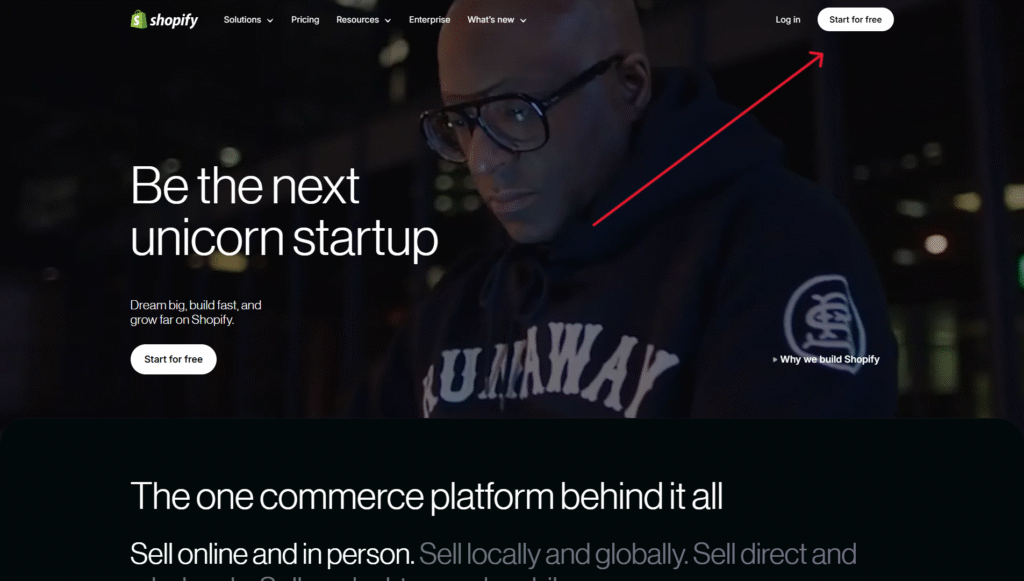
Go to shopify.com and click on the “Start for free” button in the upper-right corner.
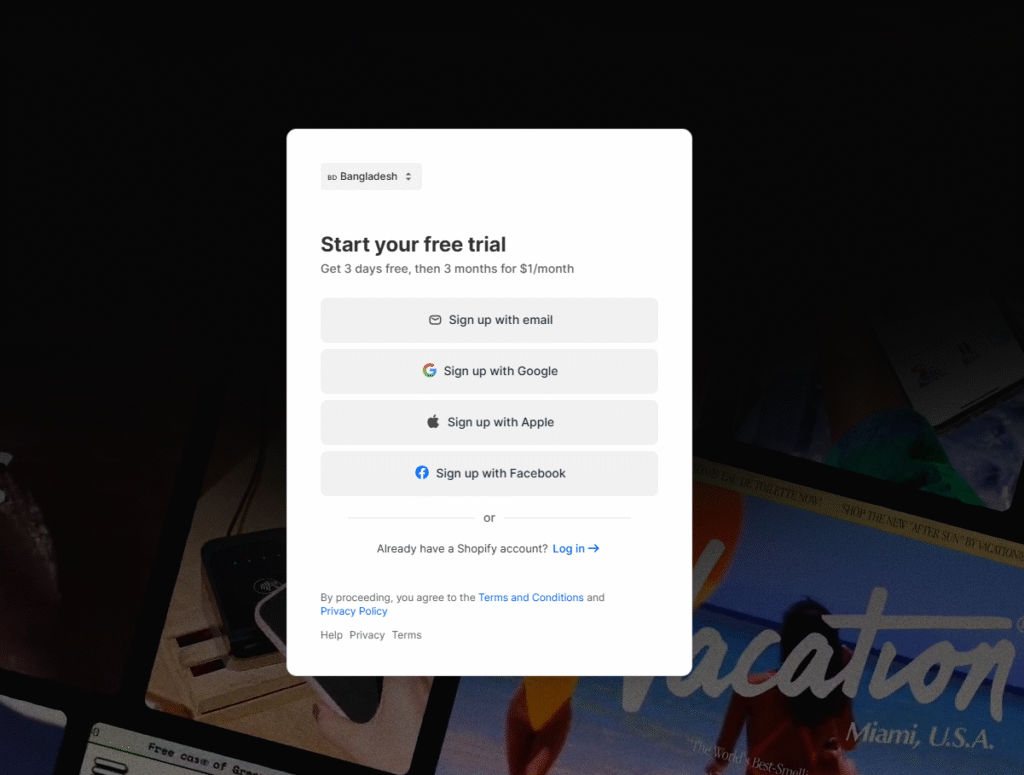
From there, you’ll have to answer a bunch of different questions, enter your email and password, and then click on the “Create Shopify account” button.
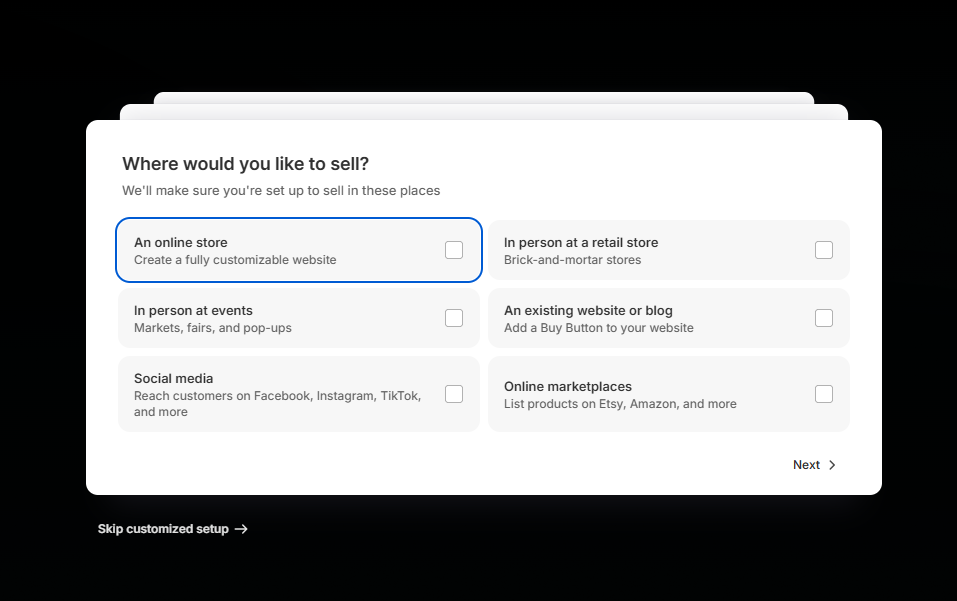
Beyond that, enter your store name. The name is going to be your store’s URL, which will look like yourbusiness.myshopify.com. You can’t change your Shopify store’s URL later. But you can buy a custom domain to make your URL look like yourbusiness.com.
Provide your commercial address and contact details, which will be used for shipping and other business-related purposes. After submitting this information, you are ready to start customizing your online store.
2. Complete the store basics
After creating your account, you’ll be redirected to your Shopify admin panel. On the left-hand side of your admin panel, you’ll see all of your Shopify store features needed to manage your store.
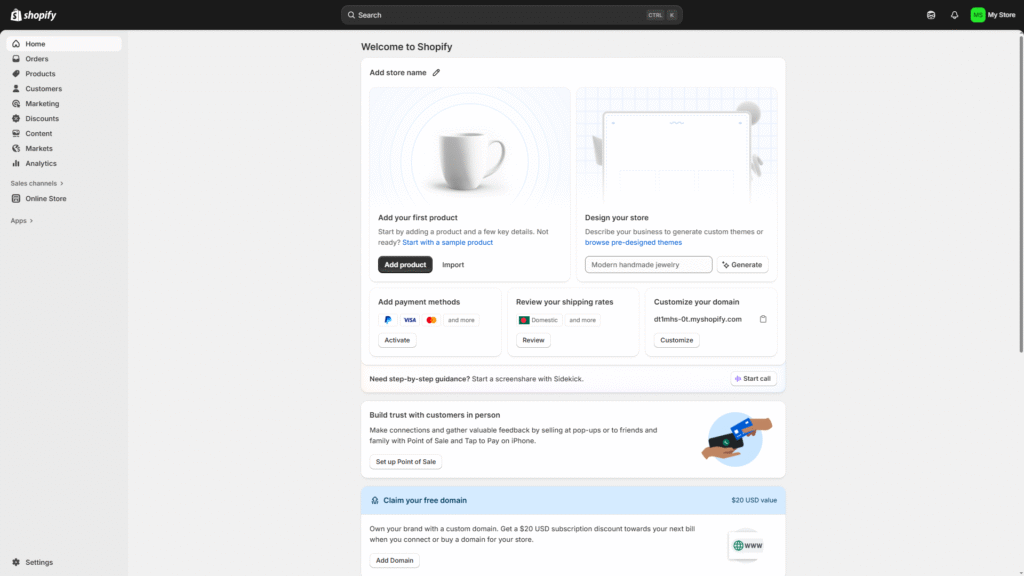
Here is an explanation of the following features:
Orders: Manage your Shopify store’s orders, fulfillment, cancellations, and reviews.
Products: Manage your product inventory—write product descriptions, upload images, set your product’s price, etc.
Customers: See the list of all of your registered customers and their contact information. You can also export this list elsewhere.
Content: Publish any type of content on your Shopify store. Content helps you boost customer engagement and your store’s visibility.
Finances: Monitor your Shopify store’s finances — revenue, expenses, profits, etc.
Analytics: Analyze sales numbers over a specific period of time to monitor how well your products are performing.
Marketing: Run customized marketing campaigns via multiple channels including email marketing, social media marketing, SMS, etc. Send reminders to customers to recover sales from abandoned carts.
Discounts: Set up customized discount codes for certain conditions such as free shipping, discounts on specific order amounts, discounts on specific products, etc.
Apps: Install and manage apps to add additional features and functionalities to your Shopify store. Apps are available for all categories, from store design, conversion, fulfillment, customer support, and more.
3. Choose your Shopify theme
Shopify provides a default theme when you open your account. However, you may want to consider switching to a different theme for a more personalized design. You can do this by clicking on the Themes option under Online Store.
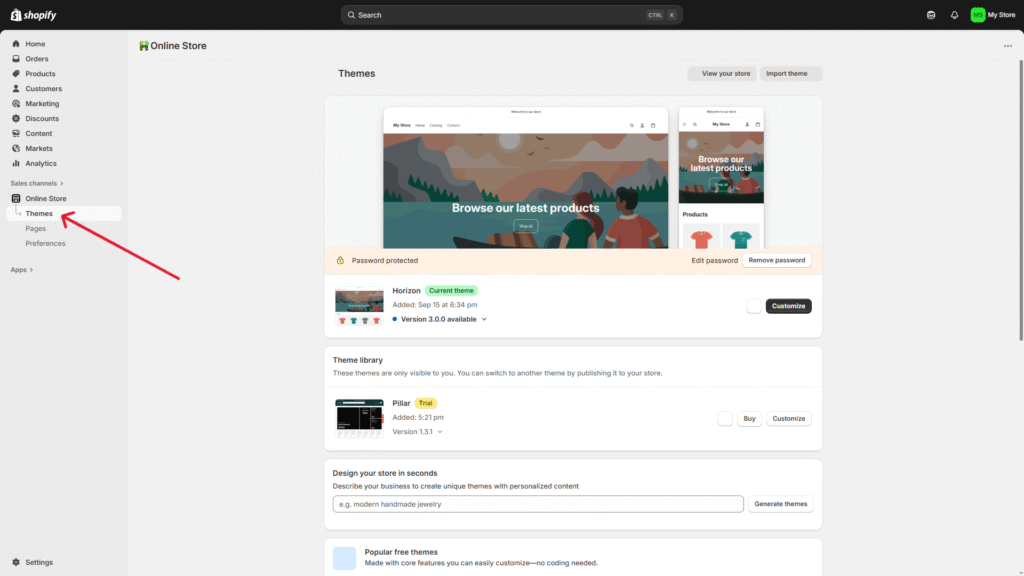
You can also try out premium themes. Click on Visit Theme Store below the free theme option to explore premium themes.
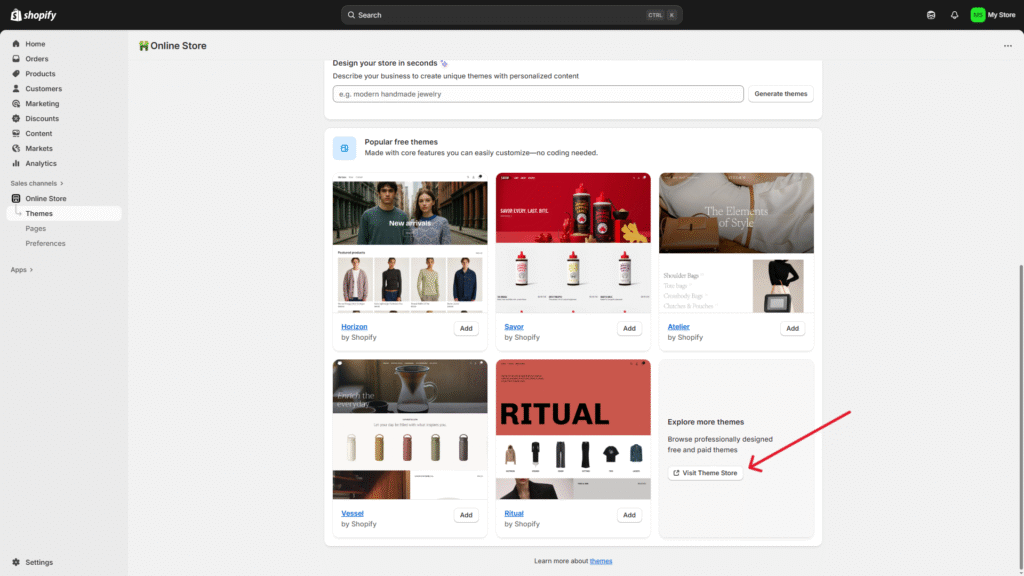
In Shopify, you can choose from many different themes optimized for various industries, including restaurants, retail stores, gyms, etc. Pay attention to the little details of a theme before making a purchase to make sure the theme works well for your specific industry.
Customize your theme
Give your Shopify store its own unique touch. Creating a unique brand identity is crucial when it comes to growing your e-commerce store. Customizing your e-commerce store is very simple with Shopify, even if you’ve never edited a website before.
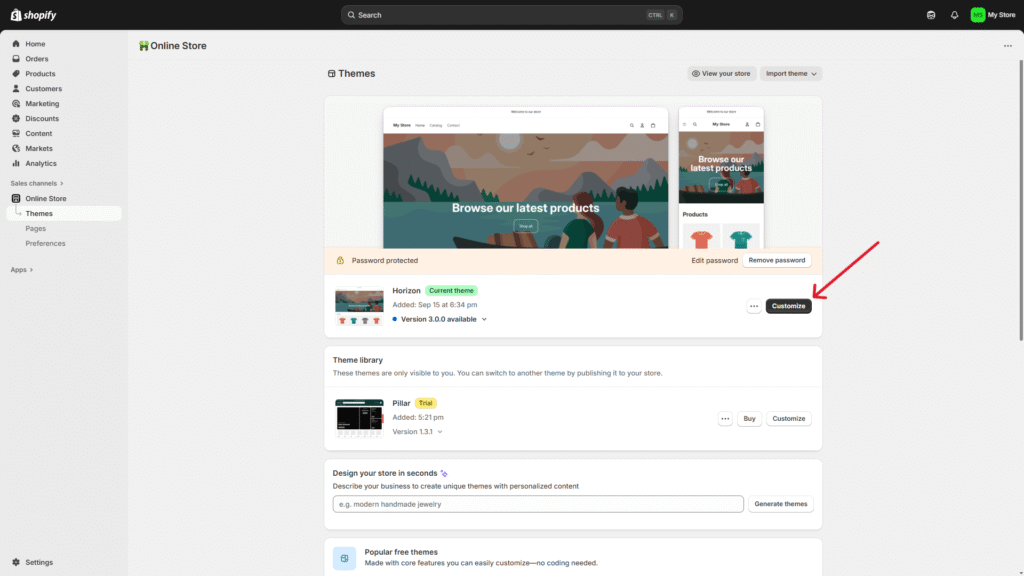
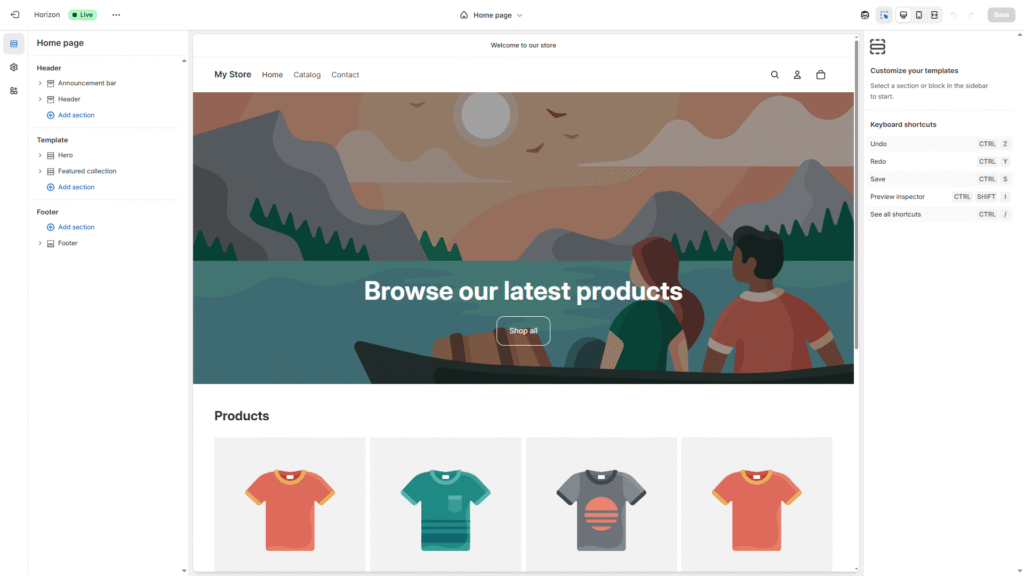
Go back to the online store page, then hover over the theme you’ve chosen for your store and click on Customize. This will open your theme editor. You’ll see each element of your page on the left-hand side menu. You can add, edit, or delete any elements you want to.
On the middle of the page, you can see a live preview of your changes on any page or element.
Don’t wait for everything to look perfect. It’s a trap that will prevent you from moving forward. Just make the necessary changes and start selling.
4. Add your products
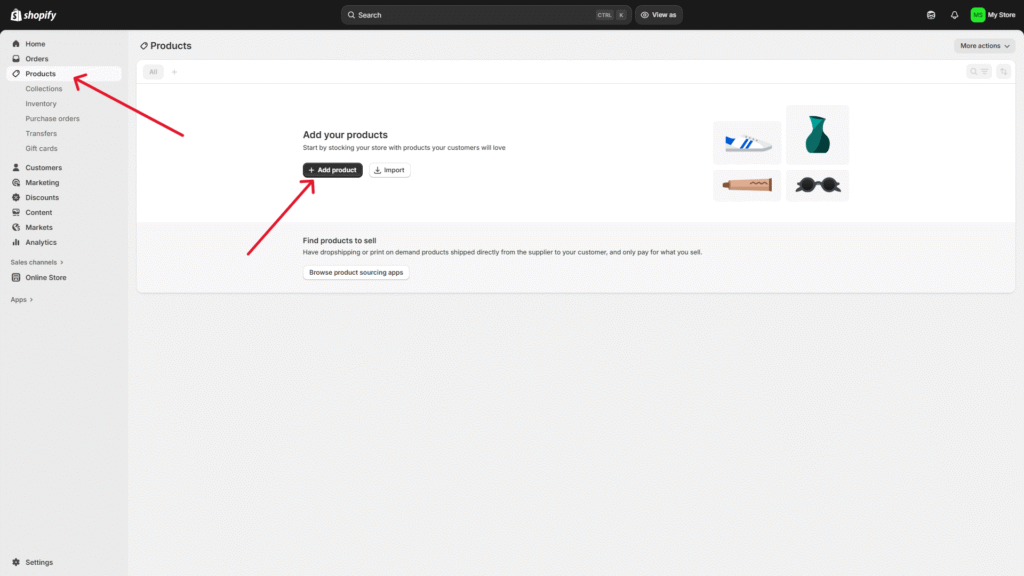
Go to the Products section of your admin panel and click on Add products.
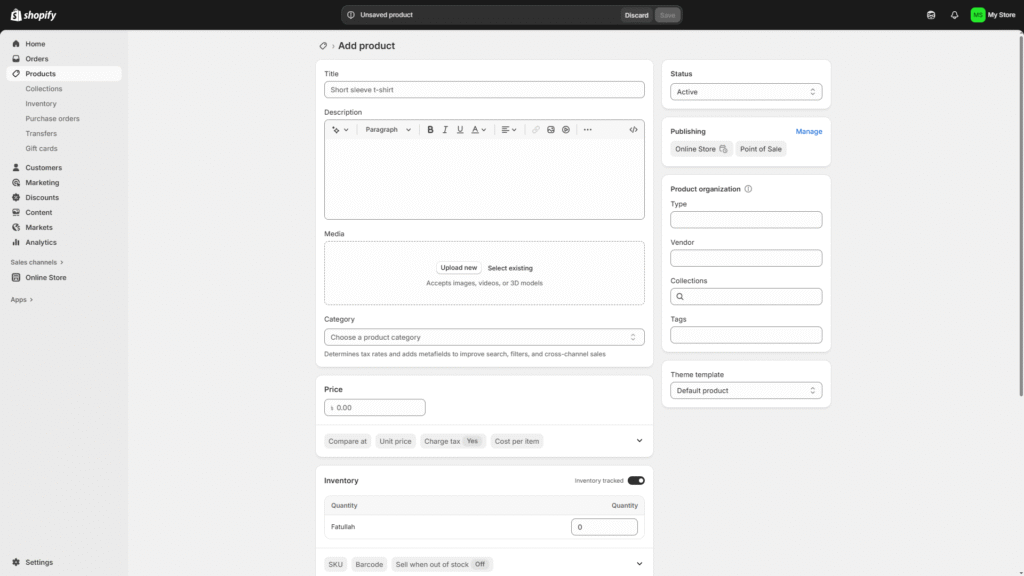
You’ll have to enter your product information, including product title, description, image, category, etc.
After entering your product information, check if the product status is in Active mode and then click Save.
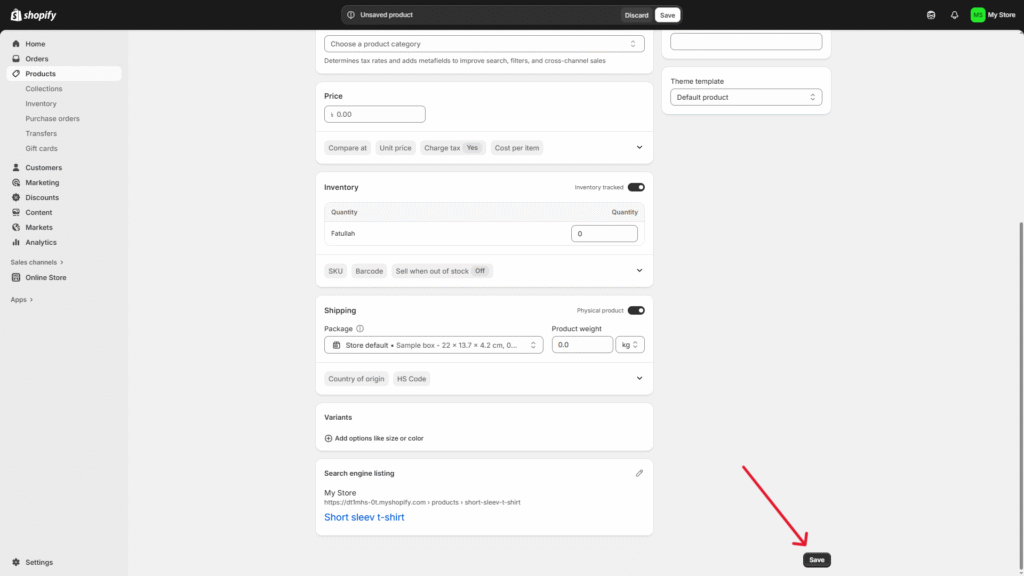
Congratulations! You’re first product is now published.
Organize your products If you’re selling products across different categories—like t-shirts, cosmetics, and accessories—organizing them into collections makes it way easier for customers to browse and find what they’re looking for.
To create collections, you have to go to the Collections page under Products. Then, click on the “Add collection” button on the upper right-hand corner of the page.
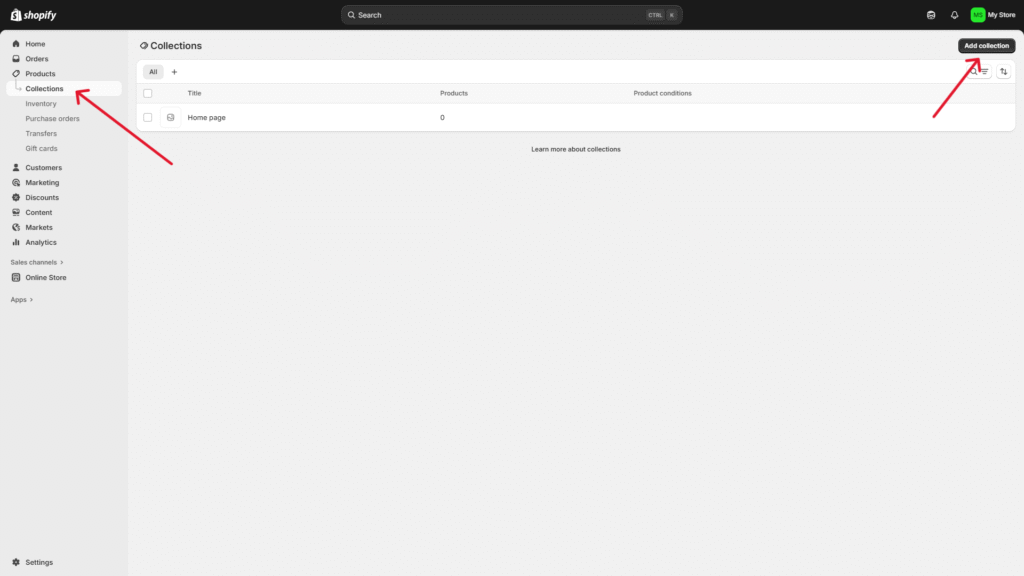
Add information about the Collection you want to create: title, descriptions, etc.
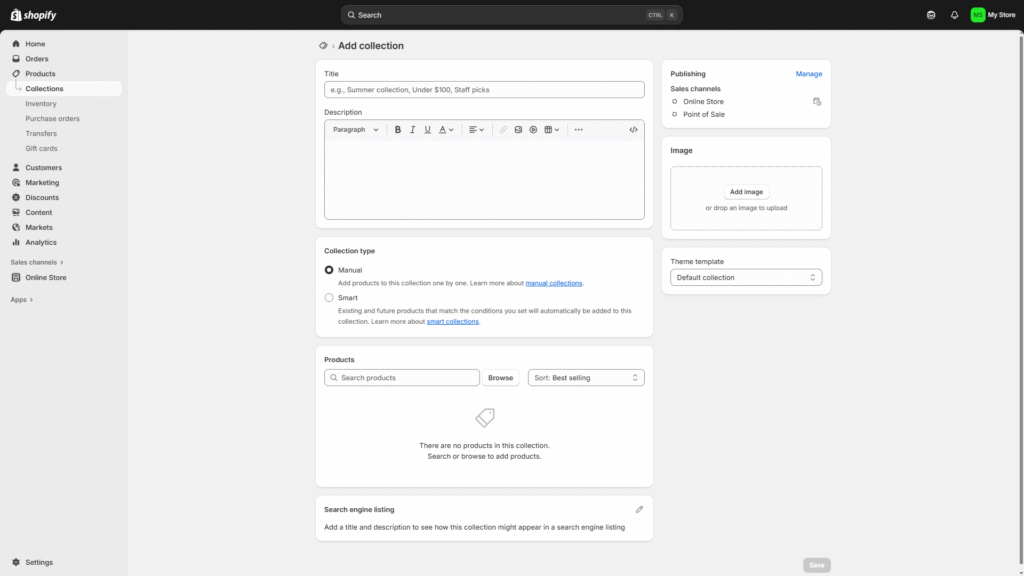
You can also set Shopify to automatically add products to a collection if a product meets certain conditions.
If you want to use the Collection feature, make sure to select a theme that allows you to add a featured image to represent a specific Collection. It gives your store a professional touch.
5. Set up your Shopify store email
Email is the most important element when you want to communicate with your customers. You need a professional business email for running contests, giveaways, coupons, and staying up-to-date with the status of customer requests. Email is also important for sending notifications and alerts to you and your staff. Every Shopify plan comes with email functionality; you just need to set up a few things.
Open your Settings page from your Shopify admin panel.
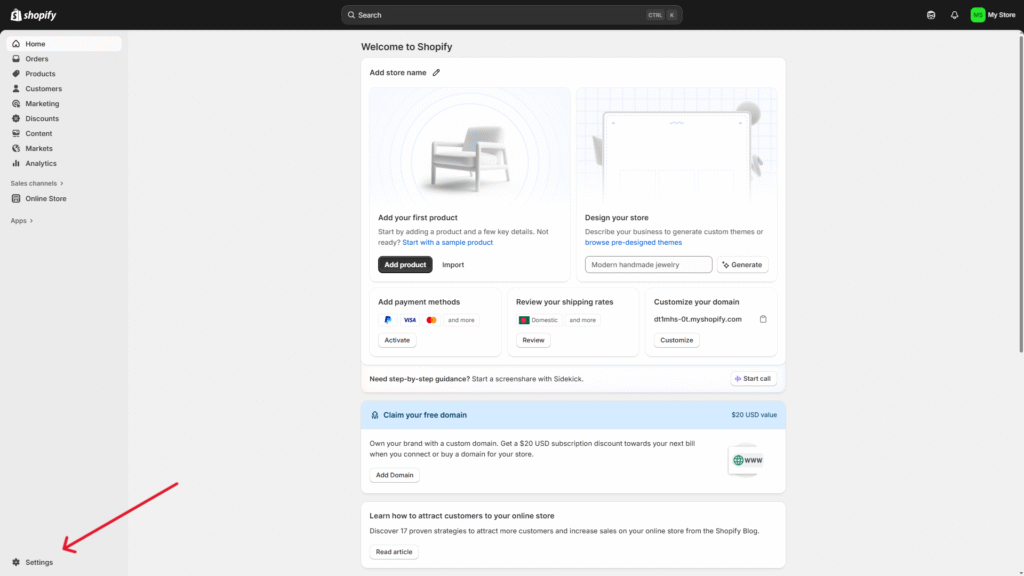
Scroll down to the Notifications option.
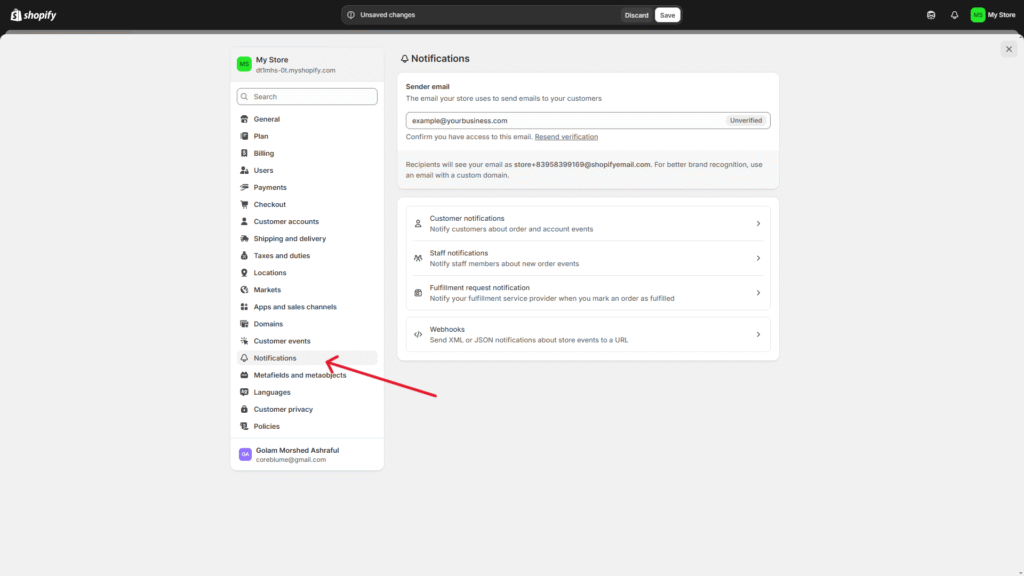
Here, you have to enter your Sender email. Your customers will see this email after making an order or when you send them marketing emails.
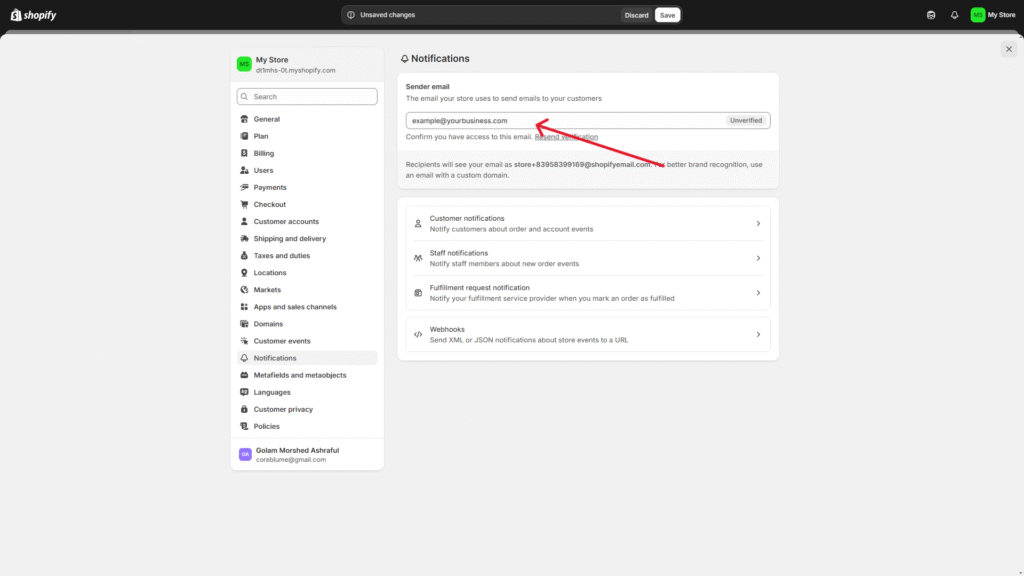
Below that, you will see the Customer Notifications option. Click on that to customize the content and design of your customer emails. You can edit many types of email notifications, like order fulfillment, shipping updates, cancellations, and more.
6. Set up must have Shopify apps
Shopify apps provide additional features and functionalities to your Shopify store. These are third-party software solutions that help you improve your customer experience, simplify operations, increase sales, and much more. There are over 8,000 apps in the Shopify app store to choose from.
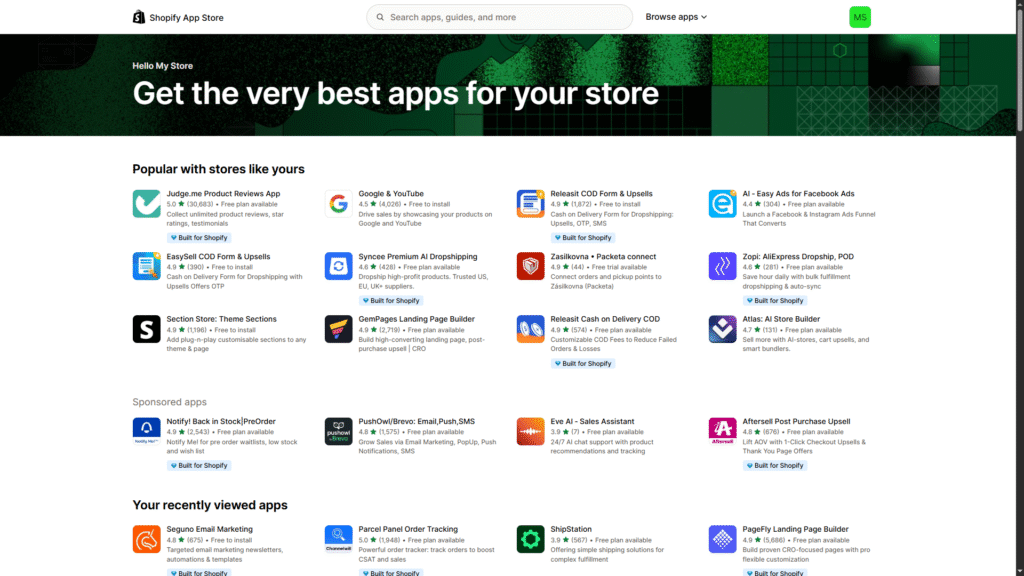
You can find apps for SEO optimization, email marketing automation, page building, theme customization, inventory management, etc. There are endless opportunities you can achieve with these apps. Most of the apps also offer free trials, so you don’t need to worry about spending upfront to try an app.
7. Set up payment options
Click on the Settings option from your Shopify admin panel. Scroll down to the Payments in the left menu.
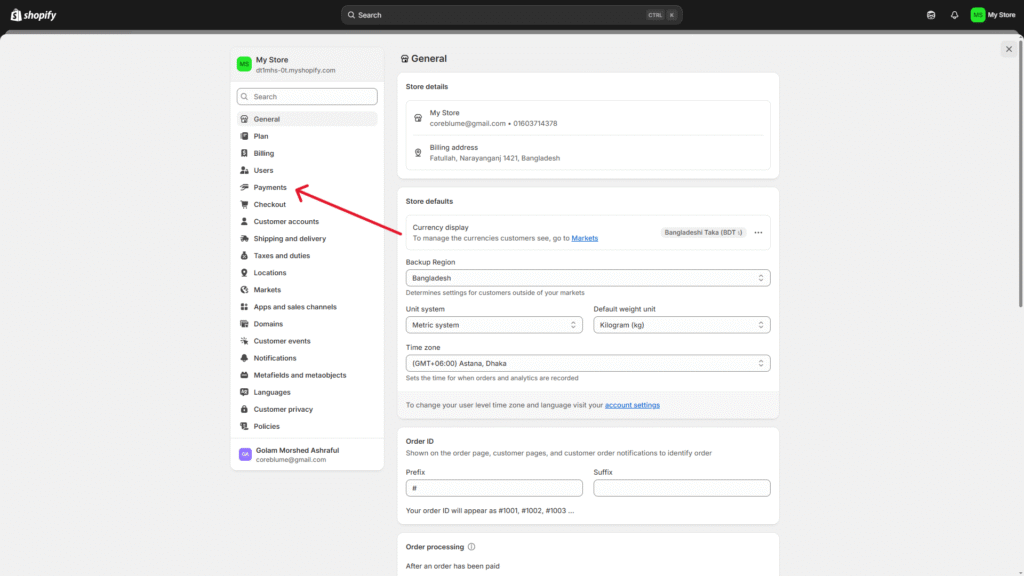
After clicking on Payments, click on Activate Shopify Payments to set up payment settings, just by following the simple steps. To receive payments from PayPal and other third-party providers, click on See all other providers below the Shopify Payment option.
8. Set up shipping rates
Go to the Shipping and delivery section of your Settings page.
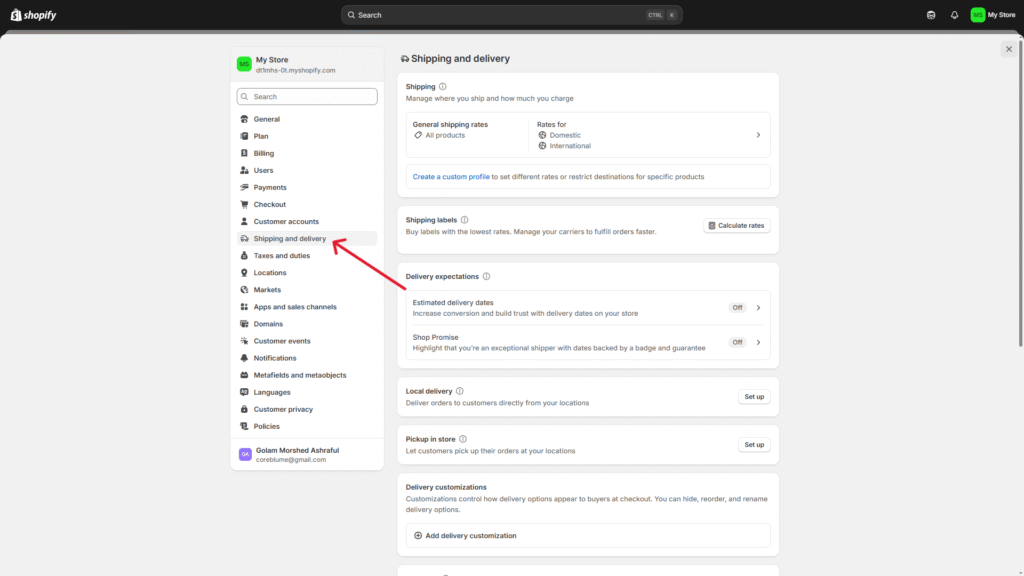
Follow these steps from there:
Add shipping rate: Add rate and fill the details—name your rate and set value, like the amount, currency, or weight.
Add conditions (optional): Based on your rate type, you can add conditions for weight-based or price-based rules to decide when they apply.
Adjust calculated rates (optional): If you’re using calculated rates, you have the option to adjust the price up or down so customers see rates that work for your business.
Save the rate: Click Done and then Save to add the shipping rate to your store.
Don’t forget to regularly review and adjust shipping rates of your Shopify store as needed. So you can provide accurate and competitive options to your customers.
9. Set up tax rates
First of all, you have to decide whether you should charge taxes on your Shopify store before setting up taxes. You need to talk to the local authorities to make sure you are following the correct tax regulations. You must register with the relevant tax authorities and obtain your tax number before starting to charge taxes on your store. After solving these legal issues, follow the following steps:
Access tax settings: Go to the Tax and duties section of your Settings page.
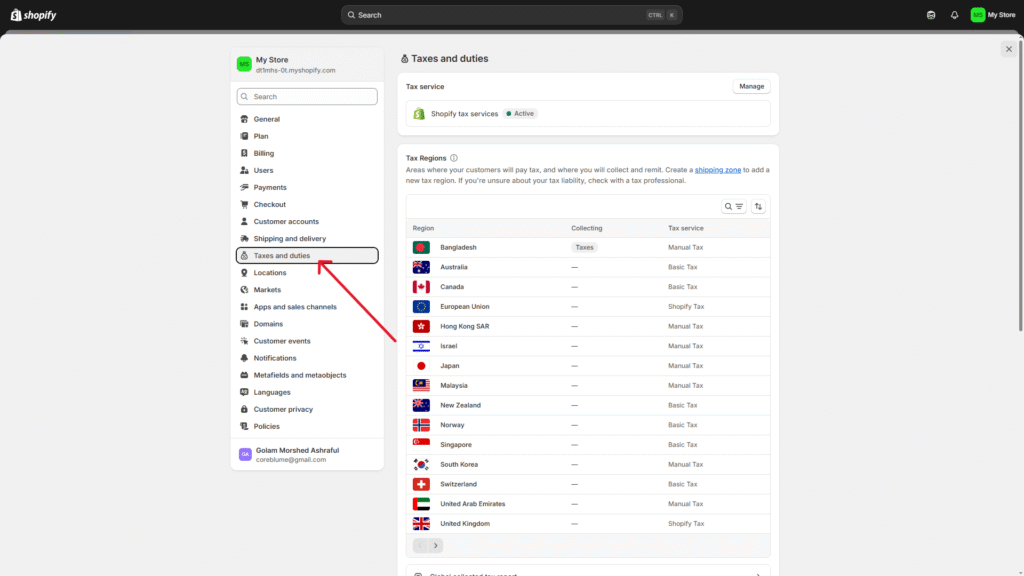
Select your country and region: Click on your country or region in the Manage sales tax collection section.
Collect sales tax: Set up tax collection for your selected country or region by clicking on Collect sales tax.
Enter tax number: Enter your tax number in the Tax number field. You can also leave this field blank if you haven’t received your tax number yet, and update it later.
Confirm tax collection: Confirm tax collection for your selected region by clicking on Collect tax.
Add more regions (optional): Click on Collect sales tax again to add more regions if you need to set up taxes for additional regions or account numbers.
Manage tax settings: You can manage tax settings, including tax overrides, exemptions, and tax calculations after setting up your tax region. It helps you charge the correct tax rates wherever you sell.
10. Connect your domain
Do the following steps to connect your domain to your Shopify store:
Go to the Domain section of your Settings page.
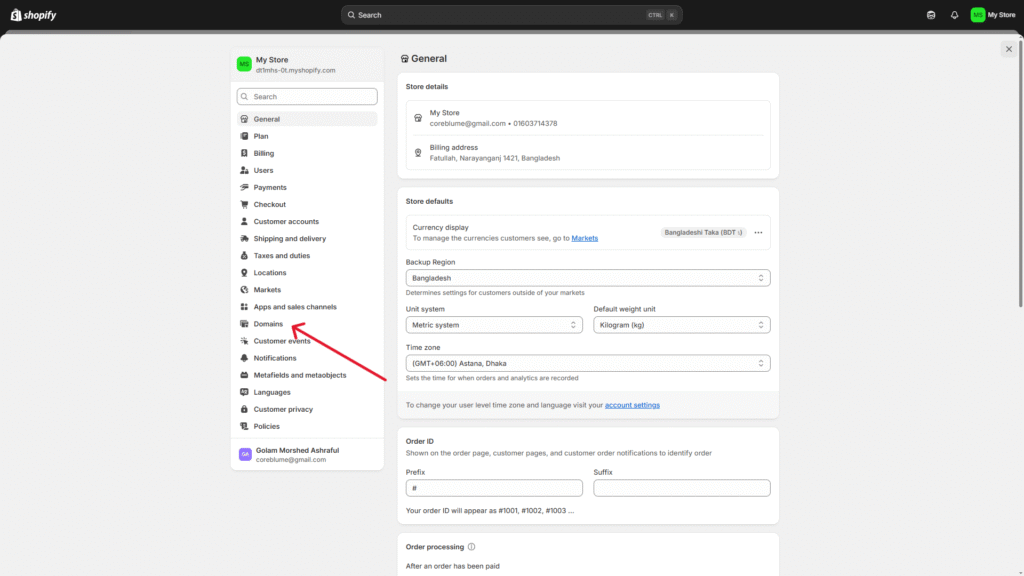
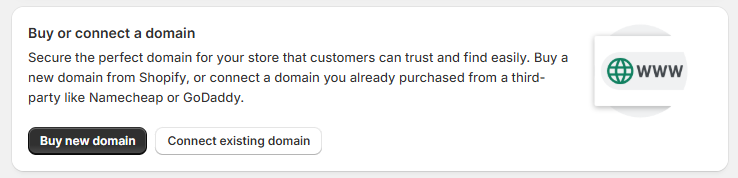
Click on Buy new domain or Connect existing domain.
Enter your domain name to connect to an existing domain (e.g., newyorkapparels.com) and click Next.
To automatically connect your domain, click on Connect automatically.
It will take around 48 hours to verify your domain. In your Domains page, it will be listed on the third-party domains section with a Connected status once it’s verified.
11. Test your Shopify store
I will highly recommend that you text your Shopify store before launch. Go to the Payments section of your Settings page.
- There is a Use text mode check box; mark that option and click Save.
- To simulate a successful transaction, you have to follow these steps:
- Go to your Shopify store
- Add one or a few products to your store cart
- Do the following checkout process as a normal customer
- To text your store, use the following credit card information:
- Name: Enter at least two words
- Expiry date: Enter a random date from the future
- CVV: Enter any three digits
- Card number: You can use one of the following card numbers:
- Visa: 4242424242424242
- Mastercard: 5555555555554444
- American Express: 378282246310005
- Discover: 6011111111111117
- Diners Club: 30569309025904
- JCB: 3530111333300000
- This will simulate a successful transaction without charging you anything.
12. Launch your store
You have to remove the password protection once you are ready to launch your Shopify store to the public. Go to the Preferences section under the Online store option of your admin panel. Uncheck the Password Protection box and then click Save.
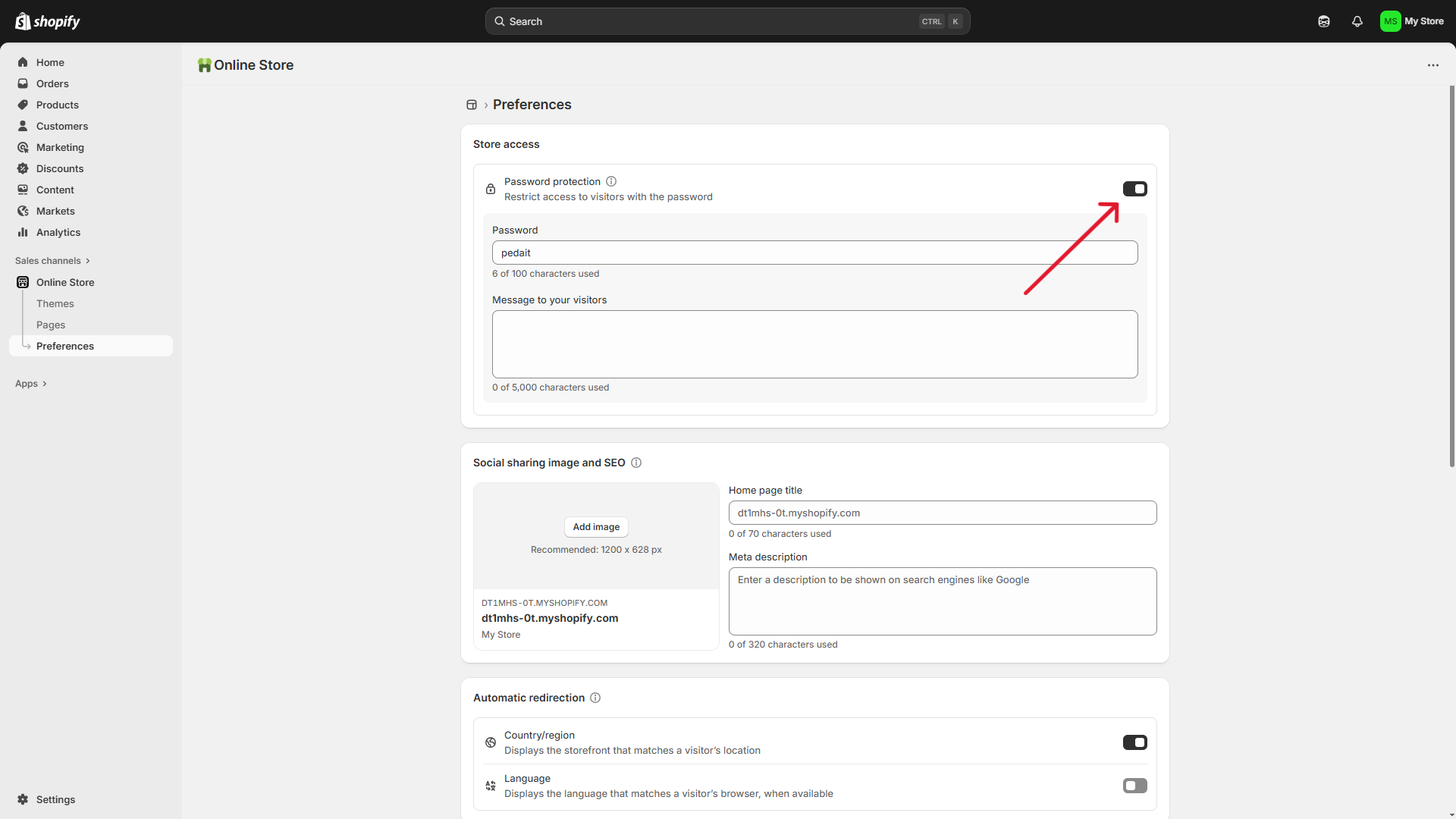
Congratulations!!! Your Shopify store is now live and ready for people to make any purchases.
How much money do you need to start up a Shopify store?
Starting a Shopify store can be expensive, especially if you want it to look professional and create a good first impression on your customers. The cost can vary based on the features and functionalities you want to include. For example, creating a basic Shopify store with a web design agency can cost you between $500 and $1,000, which is mostly the cost of standard Shopify templates.
Shopify pricing options
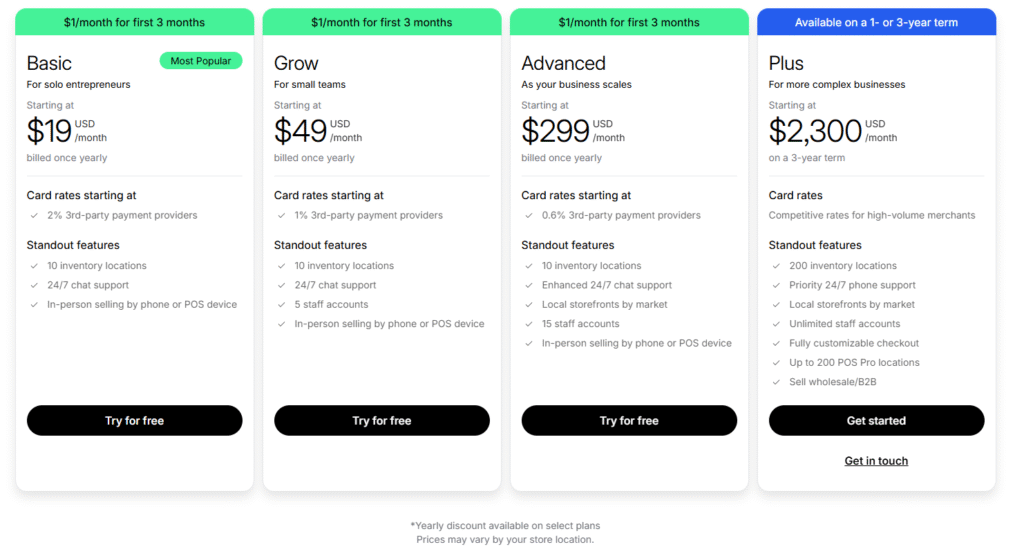
Shopify offers several pricing plans for different needs, including:
Basic: Starting at $19/month, for solopreneurs and small businesses.
Grow: Starting at $49/month, for small teams. Advanced: Starting at $299/month, for growing businesses.
Plus: Starting at $2300/month, for enterprise-level businesses with complex operations.
You can also get the free 3-day trial and your first 3 months of Shopify access for just $1 a month. It helps you decide whether the Shopify platform is actually worth it.
Creating a Shopify store on your own
If you want to know how to create a Shopify store on your own without spending too much, the primary cost is just your Shopify subscription plan. Select your subscription plan according to your business needs, as it determines available features and transaction fees. Additionally, you need to spend on:
A Domain Name — $10-$20/year.
A Theme — Free or up to $500 premium designs.
Branding (logo, visuals, etc.) — Free using DIY tools, or up $200 for professional designs.
Apps — Free to $100 per month, depending on what features you need (like email marketing, upselling, etc.)
A new solopreneur can set up their Shopify ecommerce store for just $19 per month, only spending on the Shopify subscription plan with a free theme and no paid apps. But for more advanced features and aesthetic designs, the upfront cost can reach $500 to $1,000+.
Although a solopreneur can keep the upfront cost low with the DIY approach, time is still the biggest investment. You can spend weeks learning how to do everything yourself, potentially delaying your business growth. Errors in speed optimization, payment settings, or SEO could affect your site and sales performance. Fixing them later can be very expensive.
Hiring a professional team to build your Shopify site
If you want to expand your business later, building your Shopify store with professionals from the beginning will ensure everything works well from the start. A small team comprising a Shopify developer, marketer, SEO expert, and UI/UX designer can make a significant difference while building your Shopify store.
Hiring professionals typically costs:
Shopify Developer — $3,000-$10,000 to set up your store, customize your theme, and optimize your store’s performance. (price varies depending on the amount of customization)
Marketing Specialist — $500-$2,500 for running email campaigns, sales funnels, and paid ads.
SEO Expert — $300-$1,500 for optimizing your site’s content and overall structure.
UI/UX Designer — $500-$3,000 for creating a highly converting store design.
If you’re a small business owner investing in an expert team, expect to spend between $5,000 and $20,000 upfront, depending on your business needs. Sure, it’s a big initial cost, but a professionally built store gives you lasting benefits—faster speeds, better optimization, and scalability built in. Plus, you’ll avoid the nightmare of costly redesigns and technical debt later on.
Which is the better choice for solopreneurs and small businesses?
If you’re a solopreneur testing out a new business idea, the DIY route makes total sense. But as your store takes off, you’ll need to bring in professionals—scaling on your own gets overwhelming and complicated quickly.
For a small business with ambitions to grow later, investing in a professional team upfront is a much more financially clever decision. A well-crafted Shopify store offers:
- Great marketing and SEO optimization that boost organic traffic, reducing customer acquisition costs.
- Increased conversion rates through a seamless customer experience.
- Automated business operations that minimize manual tasks (simplified inventory management, fulfillment, and customer support).
A well-designed store from the beginning saves you a lot of operational hassle in the future. So, you could focus on growing your business, rather than solving technical problems.
But eventually, it depends on your personal choice—whether you will DIY everything and hire professionals later on the journey, or whether you will invest upfront to build a store that functions seamlessly from the beginning. If you have long-term plans and ambitions for your business, investing upfront will pay off in the long run.
Advantages of Building a Shopify Website with Experts
If you’re a small business with ambitions to grow bigger in the future, building your Shopify store with a professional team is a strategic move for your business. Although Shopify is very user-friendly, an experienced team ensures that everything is optimized for seamless operations and long-term growth.
What you’ll get from an experienced team:
- A well-designed site structure that ensures seamless performance from the beginning.
- Cost-efficient development. Even though the upfront cost is high, spending on professional skills saves you from long-term overhead costs.
- A smooth and flexible integration with third-party software and tools for inventory management, marketing, customer service, and so forth.
- A professional team helps you create your own unique brand identity through extensive customization and design changes.
- It ensures a fully responsive design for every device, including mobile phones. This is so important because more than 70% of e-commerce transactions are done using mobile phones.
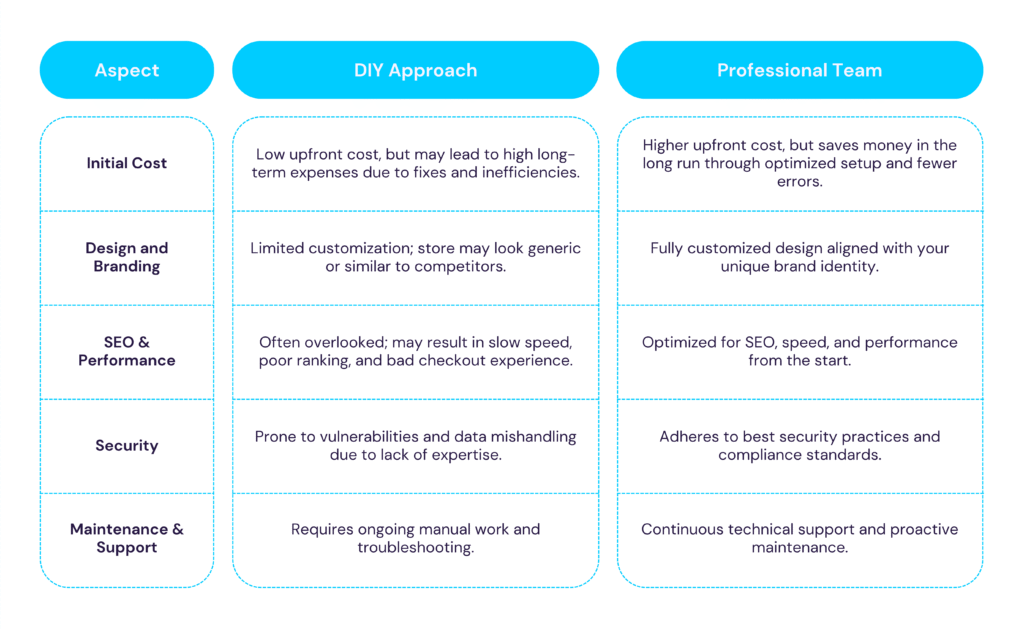
So many small businesses start with a DIY approach, but eventually they have to hire a professional team as their business operations become more complicated. Relying solely on the DIY approach has many hidden costs — slow site speed, poor checkout experiences, security vulnerabilities, SEO issues, etc. Tasks like entering personal information, delivery details, and updating product data are prone to errors. Small businesses often don’t integrate their e-commerce platform with delivery companies, payment gateways, tax software, CRMs, ERPs, and other systems; instead, they rely on manual labor. These mistakes often result in lost sales, high customer drop-off rates, etc., which require expensive fixes down the line.
But hiring a professional team removes these risks by doing everything right from the start. So you can focus on growing your business, improving customer experience, and marketing your products instead of fixing technical issues.
Legal requirements to set up a Shopify e-commerce store
You have to follow many legal requirements while creating a Shopify e-commerce store to ensure compliance with commerce laws and regulations. I highly recommend that you consult with a professional legal advisor for specific requirements needed for your business. Here are the most vital legal requirements you need to consider when creating your Shopify store:
- Website tracking: You may be required to comply with data privacy laws such as the California Consumer Privacy Act (CCPA) or the European Union’s General Data Protection Regulation (GDPR). You have to inform your users about data collection and usage, including giving them control over their sensitive information according to these laws.
- Email marketing: You have to comply with the CAN-SPAM Act, which requires you to follow transparent and honest email marketing practices, including giving your customers opt-out options and honoring their requests promptly.
- Privacy policy: You must create a privacy policy that clearly defines how you’re going to collect, use, and protect your customers’ data. Many states have additional privacy laws of their own that may apply.
- Secure handling of financial data: When you are using electronic signatures, you need to comply with the Electronic Signatures in Global and National Commerce Act (E-Sign Act).
- Consumer protection and advertising: Comply with the Federal Trade Commission (FTC) Act, which restricts misleading and fraudulent business practices. Also comply with the Consumer Review Fairness Act, which protects genuine customer reviews and prohibits businesses from suppressing them.
- Tax compliance: Comply with the sales tax laws of your state and local jurisdiction. Account for import duties and taxes if you’re selling globally. Always keep yourself up-to-date about your business tax deadlines and requirements, especially if your jurisdiction requires quarterly tax payments.
- Intellectual property protection: Register patents and trademarks to prevent unauthorized use of your brand identity and products.
- Product restrictions and shipping: Understand the legal restrictions on shipping specific products, especially when you’re selling globally. There are many products that have strict regulations and require special handling.
Keep in mind that laws and regulations are different depending on your location, target audience, and the nature of your product. It is always beneficial to seek legal advice from experts and stay up-to-date in order to set up a Shopify store that is legally compliant.
Mistakes to avoid while building a Shopify store
Shopify store owners make a ton of mistakes while developing their online store. Here are some of the most common ones:
Putting all your efforts into customer acquisition
This is one of the most common mistakes Shopify store owners make: focusing too much on customer acquisition instead of increasing customer retention. Keeping your existing customers is as important as bringing in new customers. Ignoring existing customers will hurt your business’s long-term profit potential and lower your ROI. Focusing entirely on customer acquisition will prevent you from maximizing their lifetime value. Without a solid retention plan, you will lose your customers before they ever make a repeat purchase. So, in order to boost profits, invest in both customer acquisition and retention with a solid marketing strategy.
Forgetting to set up your Shopify shipping rates
Setting up your Shopify store shipping rates is one of the first things you should do after creating your store. It’s important to save money on every order. Otherwise, it’ll quickly eat into your profits. You can create shipping rate profiles according to your needs.
- Create personalized rates for each product.
- Analyze shipping rates of your competitors to understand the expectations of your customers, so they don’t get a sticker shock.
- Setting up your shipping rates is necessary to avoid sales loss due to confusing prices at checkout.
Having poorly written product descriptions
Customers always want to know exactly what they are going to buy from you. If you don’t provide well-written product descriptions, then they won’t make a purchase from you. Instead, they will turn to one of your competitors’ products.
Avoid writing long, multi-paragraph descriptions, and structure your product details in an easy-to-read and digestible format. Use bullet points, headers, and tabs to help users easily find the information they are looking for. You can also provide additional information on your product page through Metafields. It improves customer confidence before making a purchase.
Not optimizing your Shopify store for SEO
Search engine optimization plays a crucial role in driving organic traffic to a Shopify store. SEO helps you connect with those customers who are actively searching for the products you sell.
- Optimize your essential landing pages, so they can rank well on Search Engine Results Pages (SERPs).
- Optimize the speed of your site. A slow site will negatively affect your store’s rankings and will prevent customers from making a purchase.
- Build a site that even people with disabilities can navigate and find the products they need.
Disregarding mobile users
If you choose a theme for your Shopify store that is not mobile responsive, then it would negatively affect the overall customer experience. Customers using mobile devices will face difficulties when interacting with your store. It causes frustration and higher bounce rates.
Therefore, you must choose a theme that is compatible with all devices and screen sizes. This will ensure a seamless and uninterrupted user experience for everyone.
How does Shopify support businesses of all sizes?
For solopreneurs, Shopify provides you with everything you need to launch your small business and manage your entire business operations. It gives you tools to sell locally and globally, marketing, seamless checkout, etc. You can begin to sell without even having much previous experience. Gymshark, Decathlon, and Staples have grown into successful brands by following the same path.
For a mid-sized business that is planning to expand its business gradually, the Shopify Plus platform can give it a great advantage. Shopify Plus offers more advanced features, higher customization, dedicated support, and automated tools. Brands like Jigsaw, Glossier, and Kylie Cosmetics all operate their businesses this way.
For a business achieving enterprise-level operations (e.g. Mattel), Shopify for Enterprise allows you to set up multi-channel sales, seamlessly integrate third-party tools to manage internal and external operations, and leverage a highly scalable infrastructure to grow your brand.
Why is Shopify so popular among businesses?
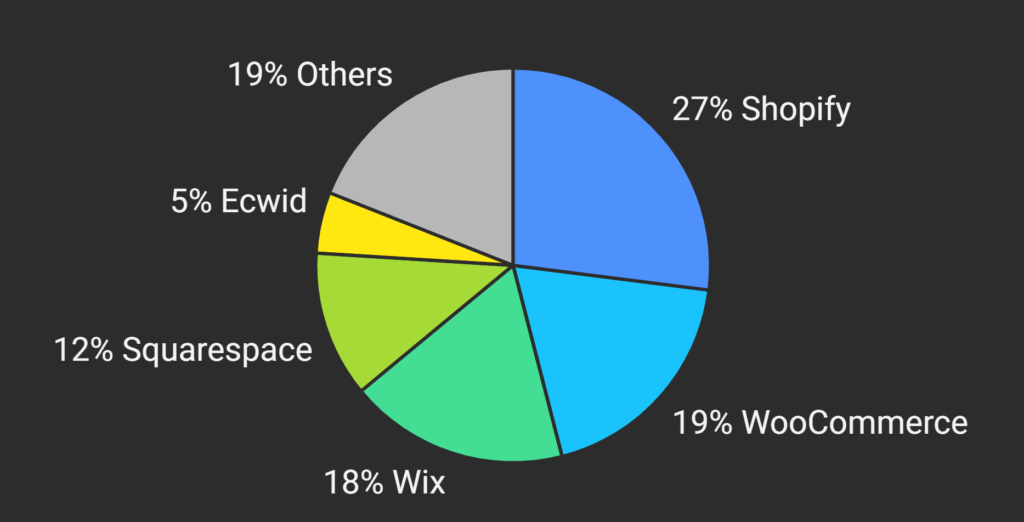
Shopify is the leading e-commerce building platform. Shopify powers 24% of the top 1 million e-commerce websites, or around 280,000 websites as of March 2025. WooCommerce holds the second position.
Shopify-based stores account for 33% of all e-commerce websites on the internet. More specifically, 5.23 million digital stores use Shopify, among which 57.65% of stores operate in the United States. In 2024, Shopify-based stores served a significant customer base of approximately 875 million customers.
What’s the reason behind such popularity?
There are several reasons why Shopify is the go-to option for e-commerce businesses and solopreneurs. Here are some of the most influential ones:
A complete set of built-in tools to manage your entire e-commerce operation from start to finish: Shopify gives businesses and solopreneurs access to everything they need to build and operate their e-commerce store: inventory management, product catalog creation, shipping, fulfillment, etc. Shopify ensures an optimized workflow with integrated tools for payments, marketing, and customer support. So you don’t need to depend on third-party add-ons.
Easy to set up and manage: You don’t have to be a tech-savvy person to set up your online store with Shopify. It has a very user-friendly interface that allows you to set up your Shopify store effortlessly without hiring a big technical team. It enables you to quickly enter the market with minimal investment and allows you to evaluate a low-risk business idea and test it without major financial loss. A fast launch helps with strategic CAPEX allocation and cost-efficient growth for scaling businesses. Large businesses can enjoy multiple benefits from strategic resource allocation, like reduced financial losses on hypothesis testing, faster time to market, and increased ROI.
Extensive customization to showcase your brand: Shopify provides you with extensive customization options. Businesses are able to choose from a wide variety of themes to match their unique brand identity. You can also create your customized design with the help of experts.
Effortless integration with tons of services through the Shopify App Store: You can improve your Shopify store’s performance in areas like inventory management, automation, marketing, customer support, etc., by using the large collection of apps from the Shopify App Store. That said, you’ll need to consider migrating to tools that can manage all of your business operations as your business scales.
Flexible third-party solution integration: You can integrate your Shopify store’s functionalities with external services using Shopify API, webhooks, and third-party middleware if your store needs personalized solutions. You can connect to custom applications, specialized payment providers, or ERP systems—expanding your Shopify store’s functionalities with the help of a development team without limitation.
Seamless payment integration for a frictionless customer experience: Customers want a flexible experience when paying for goods and services. Shopify supports multiple payment methods to satisfy customer demands and drive more sales. Shopify supported payment methods include credit cards, Buy Now, Pay Later (BNPL) services, leading payment gateways like PayPal and Stripe, and offline payment methods.
N/B: Your plan and location heavily influence this factor. Shopify Basic supports multiple payment methods and providers; that said, if you want to use multicurrency payments, you can only do it by activating Shopify Payments (which is not available everywhere). You’ll need to find and connect with local third-party payment gateway providers. Moreover, offering multiple currencies and payment options relies on how well these third-party payment gateways integrate with Shopify’s built-in checkout.
Works Perfectly Across All Devices: Shopping online is not about desktops anymore. Your customers want a smooth experience across all devices they use (e.g., mobile, tablet, laptop, desktop). With Shopify, you are able to build online stores that are compatible and optimized for all devices to ensure your store is fast, responsive, and has a user-friendly interface regardless of device. You just have to ensure that everything is set up properly.
Built-In Security That Protects You and Your Customers: Shopify follows strict rules, uses strong data protection, and has systems to prevent fraud to keep your business and customer information safe and stored correctly.
24/7 Assistance to Keep Your Shopify Store Running Smoothly: One of Shopify’s biggest advantages is round-the-clock support for everything you need—store management, technical issues, payments, or any other operational concerns. Shopify ensures prompt assistance, helping your business run smoothly, whether you’re dealing with a minor glitch or a major issue.
Conclusion
Creating a Shopify store is the first step towards achieving your business goals. If you combine high-quality products with great social media marketing, you’re bound to grow your online store into a successful brand. Remember, launching your Shopify store doesn’t have to be complicated and time-consuming. You can launch a great e-commerce website with minimal effort using the right approach and the right tools. So, go ahead and start building your online success starting today!